





















This post describes sharing as it works in TiCaNo Stopwatch v1.6.2, the build currently in both app stores; every screen and every exported field below is that build.
Distraction-Free Mode was about removing things from the screen. This post is about the opposite motion: what leaves the phone.
At some point a session stops being yours alone. The coach wants the splits, the group chat wants the result, the spreadsheet wants everything. TiCaNo’s answer to that moment is deliberately small: one dialog, two tabs, and a handoff to your phone’s own share sheet. Understanding exactly what that means — and what it does not — is the whole feature.
Let us clear the biggest misunderstanding first, because the phrase “share a session” invites it: there is no link. No shareable Uniform Resource Locator (URL), no web viewer, no server, nothing expiring or revocable. What the app produces is Plain textText with no formatting — no fonts, no styling, just the characters — readable by any editor on any platform.Read more on Wikipedia ↗, or a file, handed to the operating system — and where it goes from there is between you and the app you paste it into. This is by design, and it is also the honest description of a stopwatch that collects nothing and runs no accounts.
Where sharing starts
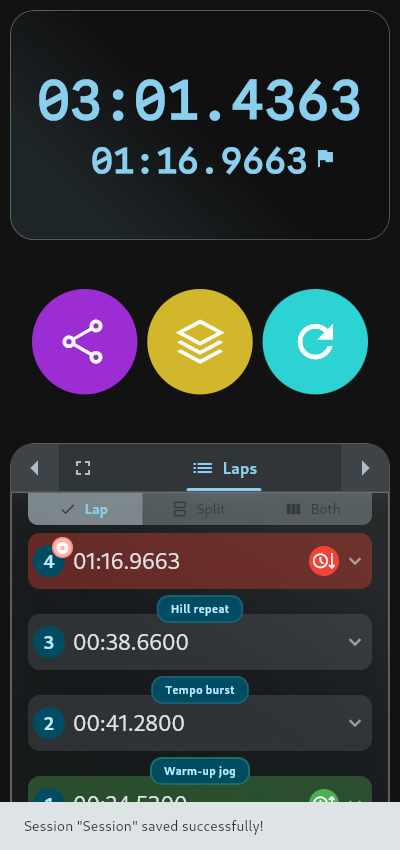
Two places, and both require the session to be saved — you cannot share a stopwatch mid-run.
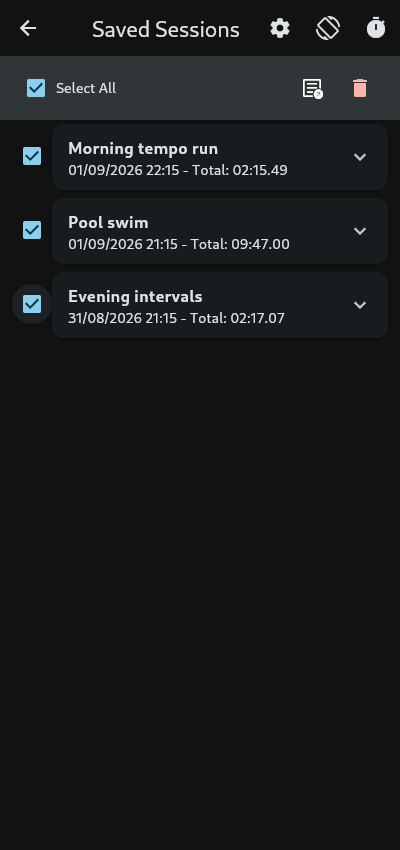
After you save a session, the control row gains a Share button; it opens the dialog on the session you just saved. And in the Saved Sessions list, every session carries its own Share action for later. A share is a snapshot of a finished thing, never a live feed — there is no real-time spectating, and no way there could be, because there is no server to spectate on.
One boundary worth naming while we are here: sharing itself is free, no upgrade gate anywhere on its path. But a share requires a save, and the free tier holds five saved sessions. The honest sentence is that sharing is unlimited and free — of sessions that passed the save gate.
The Share tab: text
The first tab produces human-readable text, ready for a message.
The basics are always there: the session name and note if you wrote one, start time, end time, total time, and every lap with its number, title and time. The lap names you wrote travel with the session — “the hill” is still “the hill” in your coach’s messages. Nothing needs configuring to get this much; it is the fixed part of the share.
Then three checkboxes, all off by default: split times, clock times, statistics. You add what the recipient needs; you leave off what they don’t. The default share is complete without being noisy, which is the entire reason the boxes start unchecked.

Two details that reward attention. The fastest and slowest laps get a trophy and a turtle marker — but only when there is more than one lap, because a single lap is trivially both. And the optional statistics block is exactly four lines: total laps, fastest, slowest, average. Nothing else fits in it, because nothing else was put in it.
One honest caveat about that “Total Time” line: it is the wall-clock span from start to end, pauses included. If you stopped the session for ten minutes, those ten minutes are in the total. The active time — pauses excluded — is something the app knows and uses elsewhere, but the share text tells the simpler truth: this is when it started, this is when it ended.
(The CSV (comma-separated values)A plain-text table format with one record per line and values split by commas; opens in almost any spreadsheet app.Read more on Wikipedia ↗ (CSV) export breaks pause time out per segment for exactly this reason. A reader who spots pause columns in the file should not assume they exist in the text share — they don’t.)
Every shared text ends with a two-line footer — “Shared by TiCaNo Stopwatch App” and the download link. That is the only URL in any of it.
The Export tab: files
The second tab writes a file and hands it to the same share sheet.
Three formats. CSV for spreadsheets and time tracking. One row per segment, with names, numbers, start and end timestamps, durations in hours, minutes and seconds, and pause time per segment. JSON (JavaScript Object Notation) for everything, with the session’s full structure intact. TXT (plain-text file) for a plain readable copy. If a session has no laps, CSV politely disables itself — there is nothing to put in rows — and TXT takes over.

The filenames are built for humans: the session name (cleaned of characters filesystems hate), the date, the extension.
And one piece of quiet craftsmanship in the CSV: every field you typed — session names, lap titles — passes through a guard that stops a lap named =cmd from executing as a formula when the file is opened in a spreadsheet. Your words arrive as words. The sanitizer has its own entry in our decisions post; here it is just the reason a shared file is safe to open.
The boundaries, stated plainly
The full list of what sharing is not, so nobody has to discover it:
- Not batch, in text. Select many sessions in Saved Sessions and you can export them together as one CSV, JSON or TXT file. Text-sharing many at once is not supported — the text share is one session, complete, by design.
- Not a round trip. The shared text is for humans; there is no “open in TiCaNo” and no import. If a recipient wants the session in their app, they time it themselves — which is arguably the point.
- Not styled. A session carries data — laps, names, pauses, the event log — and no theme, background or colours. A share is a record, not a screenshot.
- Not networked. No upload, no sync, no email automation. Sessions live on your device; sharing copies text or a file out through the system’s own door.
- Not precision-blind. All four output paths — text, TXT, CSV, JSON — honour your export-precision setting. (This was once not true for two of them; it was fixed. A bug repaired is worth more than a feature that never broke.)
The point
The design work in this feature went into what a share contains — the defaults that are complete, the extras that opt in, the precision that travels, the guard that defuses — rather than into infrastructure. That is what curation without a server looks like: your session, readable by anyone, owned by no platform.
When the moment comes, open TiCaNo Stopwatch, save the session, tap Share, and choose what the recipient sees. The app’s part ends at the handoff. The record’s part is already done.
Sources
All app claims in this post were verified against the shipped TiCaNo Stopwatch v1.6.2, the build currently in both app stores. They were read from that build’s own source at the commit it was cut from — not taken from marketing copy or release notes. The export, share-sheet and sanitizer behaviour described above was checked there directly; the file-and-line pins are kept with the post’s research rather than printed here, because they name a private repo and would rot the first time a file moves.