




















This post is about TiCaNo Stopwatch v1.7.0, released on both app stores on September 9, 2026; every screen shown here is that build.
Six weeks from now, lap 3 will mean nothing to you.
Lap 3, 01:42.118. It is data. It was data the moment you logged it — accurate, stored, exportable, and anonymous.
What it is missing to become a record is three words: “warm-up”. “The hill”. “Set 3”. A record is data that still answers questions later, and the answer to which lap was the hill is not stored in any stopwatch number. It has to be written down by the person who was there.
TiCaNo lets you write it down on the lap itself, and — we will be honest about this — the feature is easy to miss. There is no button in plain sight. This post is the map: how to name a lap, and where the name travels.
How to name a lap
In the Laps tab, tap the lap’s row. The row expands, and the expansion reveals an Add title button — or Change title, if the lap already has a name. A small dialog opens, you type, you save. A named lap wears its title as a floating label above its card, so the Laps tab reads like an itinerary: warm-up, the hill, set 3, cool-down.
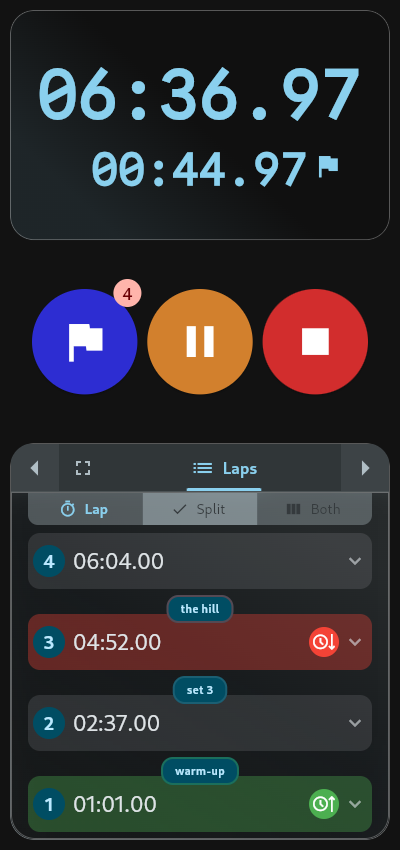
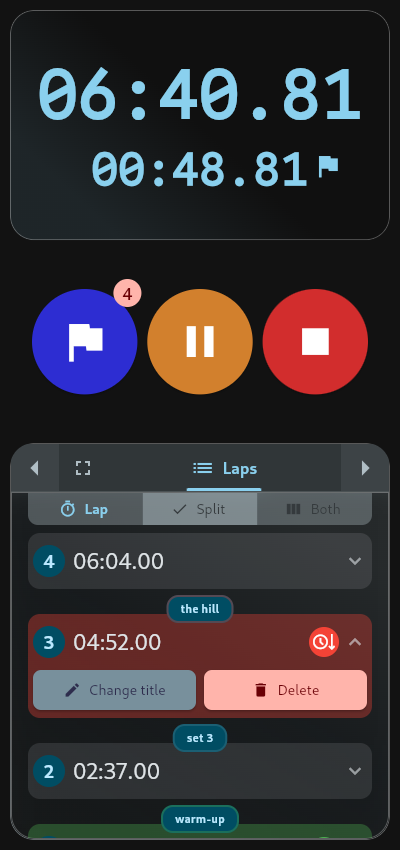
Three rules the dialog enforces, quietly. It trims stray whitespace on save. It caps the title at 50 characters. And if you clear the field and save, the lap goes back to its default name, “Lap 3” — un-naming works the same way as naming.
The button sits one tap deep, behind a row that does not advertise itself as tappable. That is a design choice you can argue with, and we do. What we cannot tell you is how many people ever find it: the app ships no analytics, so nobody — including us — has ever measured feature discovery. We can only say the affordance is shallow, and that this post exists to make up for it.
Naming lives in the Laps tab, which is free.
When the name saves

Two moments matter: during the run, and after it.
Name a lap mid-session and the title stays with the running session. If you have already saved the session, a title change is written to storage the moment you make it. If you have not, the titles ride along as unsaved data — and Reset knows the difference, warning you before it discards a session that carries named laps.
After the fact, a saved session can be renamed too, but not where you are probably looking. Reopening a session shows its laps read-only: tapping a row does nothing, by design. Renaming happens from the Saved Sessions list — tap Edit, and one form opens with the session name, a notes field, and every lap title in a single list. The session name is required and capped at 100 characters; the notes field gives you three lines; the lap titles are all there together.
One boundary worth knowing: sessions live on your device. There is no account, no sync, no cloud copy. Your record stays where you made it.
Correcting the record
A record you cannot correct is a trap, and deleting a mis-logged lap is more considered than it looks. When you delete a lap from the middle of a list, its time is not thrown away — it is added to the next lap, so your splits stay true and the total never changes. Every lap after the deleted one is renumbered. Delete the last lap while the timer is still running and its time folds into the segment in progress.
The confirmation dialog says exactly what will happen, and it says one more thing worth repeating here: this action cannot be undone. There is no undo anywhere in the app. The dialog is the safety net.
Where the names travel
A name that stayed on one screen would be a label. These travel:
- The Laps tab — the chip above each card.
- The Edit screen — every title in one form, as above.
- The Stats tab — the fastest lap is marked with its name: a three-line card reading “Fastest Lap”, “#3 the hill”, and the time.
- The Timeline — one tap deeper than the card. The timeline cards themselves deliberately show only “Lap 3”; open an event’s detail sheet and a named lap reads “Lap 3: the hill”.
- Every export — the name travels in all four formats, and no format exports an unnamed lap as blank.

In CSV (comma-separated values)A plain-text table format with one record per line and values split by commas; opens in almost any spreadsheet app.Read more on Wikipedia ↗ and JSONJavaScript Object Notation (JSON): a plain-text format for structured data, written as named fields and lists; widely used to move data between programs.Read more on Wikipedia ↗ exports, the name rides in a column called segment_name, and an unnamed lap is substituted with “Lap 3” so no cell is left blank. Your spreadsheet stays whole whether you named five laps or none. The stored truth underneath is unchanged: laps keep their times in MicrosecondOne millionth of a second (0.000001 s).Read more on Wikipedia ↗ and their titles as text, and the export renders the same stored measurement the display shows.
And in the text exports — the ones built for sharing — your fastest lap is listed with its name. “Fastest Lap: #3 the hill”. The Stats tab says it in the app; the exports say it everywhere else. (The Stats tab is part of Pro; the Laps tab it builds on is free.)
A morning, not a marathon
None of this requires sport. The same mechanic answers a quieter question: how did I spend my morning?
Start the stopwatch when the morning starts, and tap a lap at each turn: lap 1 “cleaning the kitchen”, lap 2 “went for a walk”, lap 3 “made some calls”. Stop, and the day is a record — each part timed, each part named, in the order it happened. Six weeks later it still reads like a diary entry that happened to be accurate to the MillisecondOne thousandth of a second (0.001 s).Read more on Wikipedia ↗.
The running examples in this post are running examples because runners name laps most often, not because laps belong to running. A lap is just “the next thing”, and the name is what the next thing was. Warm-up, the hill, set 3 — or the kitchen, the walk, the calls. The record does not care which.
Data into record
The store copy ends its editing section with a sentence we did not write for this post but would have: your record should describe what actually happened. The numbers already describe when. The names are how the record says what.
That is the whole argument for the three seconds it costs. When you press start on TiCaNo Stopwatch, you get accurate intervals for free — the data arrives on its own. The record is the part you author. Tap the row, add the title, and lap 3 stops being a number that once meant something to nobody, including you.
Sources
All app claims in this post were verified against TiCaNo Stopwatch v1.7.0 (1.7.0+29, released on both app stores September 9, 2026) — checked against the shipped code and by running the build, not by reading marketing copy. Platform-behavior claims (Android’s foreground-service rules, iOS background limits) follow the official platform documentation for each current OS release.