





















Every feature in an app is a bet. Most bets get renegotiated every few months, quietly, in release planning. A few get made once, deliberately, with the trade-offs priced in — and then never touched again, because touching them would reopen a settled argument.
This post is six of ours. Not slogans; decisions, each with the price we agreed to pay. The source of truth is the code itself, and honesty requires one caveat up front: “decided once” means settled now, not ancient. Two of these six were re-decided within the last few releases. What makes them ours is that the argument is closed, not that it is old.
1. The wall clock, not a perfect clock
The stopwatch reads the phone’s clock at start and at stop and subtracts. It does not use a self-contained Monotonic clockA clock that only ever moves forward and cannot jump, used inside devices to measure how long something took. Network time corrections adjust the wall clock, never this one.Read more on Android Developers ↗, even though the code still creates one — those objects are never read for time, and the code comments say so plainly.
The reason is survivability, and it is written into the code: elapsed time must not depend on any timer surviving, because the operating system suspends timers whenever it pleases. A monotonic counter dies with the process. Clock arithmetic survives process death and state restores — everything except the phone forgetting what time it is — and the full mechanics of that survival have their own post.
The price is real and we have never hidden it: the reading follows the phone’s clock wherever it goes. If the clock is corrected mid-session, the interval moves with it. We chose a stopwatch that keeps running through anything over a stopwatch that is immune to clock changes, because the phone’s clock is corrected far less often than processes are killed.
What this decision is not is an accuracy claim. The wall clock is not more accurate than a monotonic counter; it is more durable. We have written at length about what the digits do and do not promise, and durability is the only promise this decision makes.
2. The notification is the price
On Android, every running session keeps the app alive with a Foreground service (Android)An Android mechanism where an app declares work the user asked for, keeping it running while the screen is off — at the price of showing a notification.Read more on Android Developers ↗, and a foreground service means a notification. There is no version of this that is notification-free; we chose to pay in the least intrusive currency: silent, low-importance, no sound, no vibration. It cannot be swiped away while the session lives — that is what makes it a foreground service.
This decision has a hard edge, and we will state it rather than gesture at “keeps running reliably”. Android 15 caps this type of service at six hours per day. The app does not fight the cap; past it, survival comes from the same wall-clock arithmetic as everything else — reopen the app and the interval is reconstructed from stored timestamps. The notification buys up to six hours of immunity; the wall clock buys the rest. Even a paused session restarts the service after a process kill, so the state is never orphaned.
And it is an Android decision. iOS has no equivalent mechanism, and we do not pretend otherwise: on iOS the guarantee is the weaker, honest one — the wall clock restores the interval when you return to the app.
3. Keep Screen On is off by default
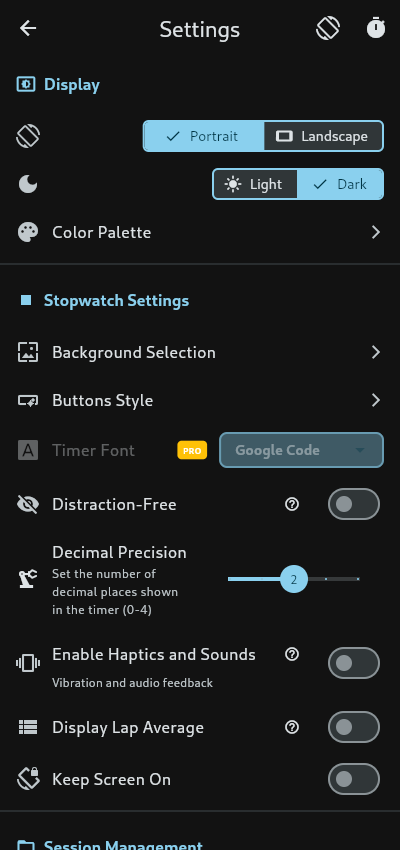
There is a setting that keeps the screen awake while the stopwatch runs. It is off unless you turn it on, and it does exactly one thing: holds the screen. It does not hold the timer — that is the notification’s job on Android and the wall clock’s job everywhere. The two mechanisms are independent, which is precisely why the setting is a choice. We did not assume your battery owes us its evening; a stopwatch that survives with its screen off does not need the screen on.
4. No analytics in the shipped app
The app as shipped contains no analytics software development kit (SDK) — no Firebase, no tracking, no advertising identifier, nothing that phones home. The in-app privacy page says it in one sentence: the app does not collect, track or transmit any data automatically, and everything you record stays on your device.
This one is a re-decision, not an original one. Analytics shipped once, in an early version — screen tracking, via Firebase. It was later removed, and today the dependency list is clean. We cannot give you the date: the release notes from that period are internally inconsistent, and we would rather admit the record is messy than invent precision. What is verifiable is the state of the code now, and the code now collects nothing — which is a claim about this build, not a promise about every build after it.
The decision cost us the usual instrument panel — we cannot tell you how many people find a feature, which is why the lap-naming post had to argue from design rather than data. We pay in blindness, on your behalf. Settled.
5. Thirty seconds of faith
Running state is written to storage on start, on every lap press, and every thirty seconds while running. The total is always recoverable; the newest laps are not necessarily. A hard kill in the window between writes can lose the laps recorded since the last save — up to thirty seconds of them — while the running time itself rebuilds perfectly from its stored start.

We could save on every tick and spend your battery on disk writes, or save never and lose everything. Thirty seconds is the priced-in middle. It is the least glamorous decision on this list and the one most likely to matter to you, so it is stated here in full rather than left in the code.
6. Exports that defend themselves
Two decisions, both young, both locked.
Every CSV (comma-separated values)A plain-text table format with one record per line and values split by commas; opens in almost any spreadsheet app.Read more on Wikipedia ↗ (comma-separated values) field the app writes passes through one sanitizer that handles two threats at once: structural quoting done to the Request for Comments (RFC), and the stranger one — spreadsheet formula injection. A lap named “=cmd” or “+1” could, in some spreadsheets, execute as a formula when the exported file is opened. The sanitizer prefixes such fields so every cell arrives as inert text. Your lap names stay your lap names, not live ammunition in someone’s Excel.
And the export-precision setting is honoured everywhere it should be. This was once a real defect — the setting silently did nothing for CSV and JSONJavaScript Object Notation (JSON): a plain-text format for structured data, written as named fields and lists; widely used to move data between programs.Read more on Wikipedia ↗ (JavaScript Object Notation) — and it was fixed, properly, in the same release that introduced the vsync-locked display updates. That tick no longer pretends to be the clock: it paces repaints only, and the displayed value is recomputed from the wall clock every frame. Both changes landed together and both stay.
The seventh decision, not yet made

Honesty has one more entry. There is a phrase on the About page that no measurement in this codebase supports — it promises “millisecond accuracy” — and the app’s own Terms of Service decline to guarantee precise timing at all. We have written around it, dissected it, explained why the number is malformed rather than modest — but the string is still shipping. That is not a decision we made once. That is a decision we owe.
Settled, not sacred
None of these six are immutable truths. They are priced trades with owners: durability over clock-step immunity, a silent notification over background death, blindness over tracking, thirty seconds over your battery, defensive exports over naive ones. TiCaNo Stopwatch is the sum of choices like these, and we would rather show you the receipts than the slogans.
Sources
All app claims in this post were verified against the shipped TiCaNo Stopwatch v1.6.2, the build currently in both app stores — checked by running the build, not by reading marketing copy. Platform-behavior claims (Android’s foreground-service rules, iOS background limits) follow the official platform documentation for each current operating-system (OS) release.